Temple Square
- 4.8
- Rating
- 10.00K
- Installs
- Free
- Price

 Analysis by App-foxy
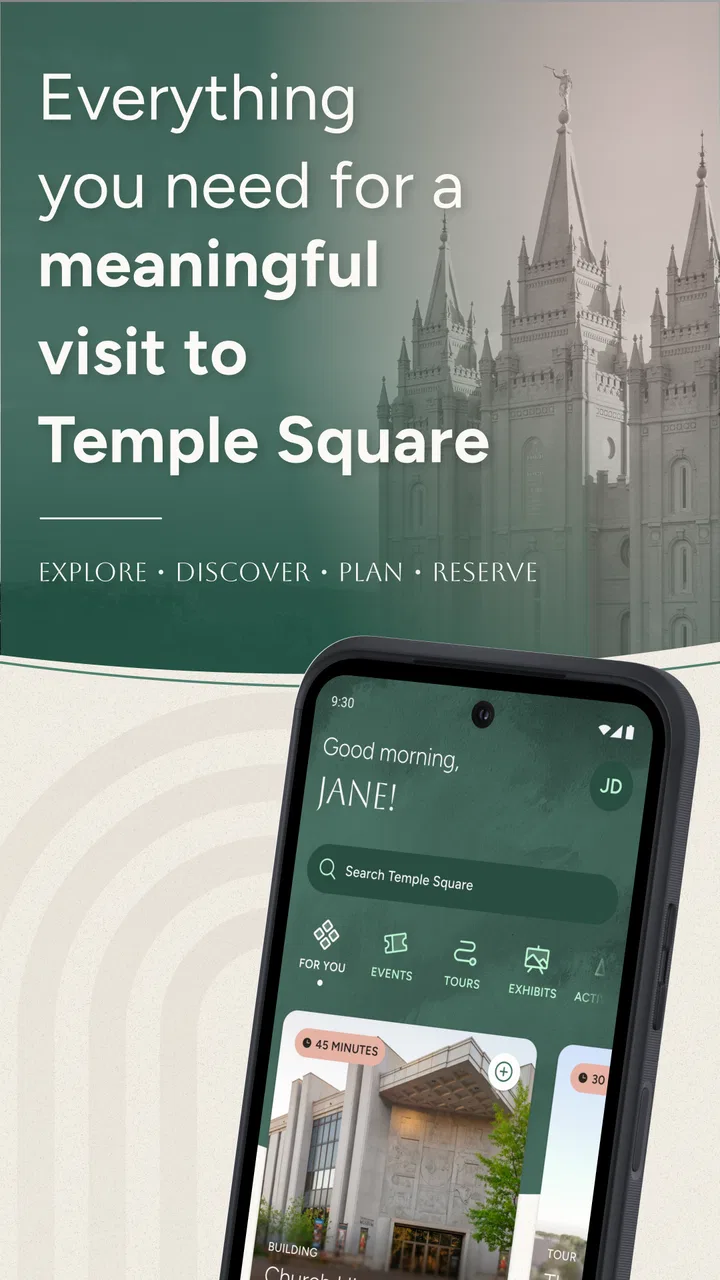
Temple Square is the kind of travel app I would open before leaving for a visit, not after arriving and feeling lost. It is the official visitor guide for Temple Square, created by The Church of Jesus Christ of Latter-day Saints, and its focus is deliberately narrow: planning a visit, understanding tours, and exploring the site. That narrow purpose is also its main appeal. Instead of forcing a general map, review site, or search engine to do the work, it gives the destination its own place on your phone.
I approached it as a practical visitor rather than as someone already familiar with the location. The useful question is not simply whether it contains information, but whether that information can be found calmly when a person is travelling, managing a group, dealing with a busy environment, or trying to plan around different abilities. My overall impression is positive, especially for first-time visitors, although it works best as a companion to broader travel tools rather than as a complete replacement for them.
How clearly the guide supports different visitors
I find that the guide’s clearest value is helping visitors make a plan that suits the people coming along, rather than treating every outing as a one-size-fits-all tour. In this section, I’ll look at how that focused approach can support different needs and why a little preparation can make the visit feel more manageable.
You May Also Like

 AccuWeather: Weather Radar
AccuWeather Review: A Quick, Clear Forecast for Everyday Decisions
For everyday plans, the best forecast is the one you can understand quickly. AccuWeather makes rain timing, radar, and local conditions easy to act on, with a few trade-offs.

 Hill Climb Racing
Why Hill Climb Racing Still Turns Crashes Into One More Run
A tiny car, a bumpy hill and one more upgrade: Hill Climb Racing keeps resurfacing because its simple chaos makes every near-miss feel personal.

 AliExpress - Shopping App
AliExpress Makes Global Shopping Feel Personal, but Shoppers Bear the Risk
AliExpress turns a global marketplace into a pocket-sized discovery engine. Its reach is useful, its shopping loop compelling, and its trade-offs easy to miss.

 Lords Mobile: Kingdom Wars
Lords Mobile Is a Kingdom-Building Routine, Not a Quick Match
A case-by-case verdict on the building, battles, device demands, and social commitments that make Lords Mobile rewarding for some players and exhausting for others.

 PDF Scanner app - TapScanner
TapScanner Makes Paperwork Easier to Capture, Check, and Share
TapScanner makes scanning with a phone feel less like a rescue operation and more like a dependable step in getting work done. Its capture tools are useful, though not flawless.

 Block Blast!
 Shows How Much a Puzzle Game Can Leave Out
A quiet grid game shows why puzzle players increasingly value instant clarity, repeatable skill and low-pressure play—and where the genre still needs to catch up.
More From Our News Desk
View All News


Readable planning before the visit
The strongest part of the experience is the way it gives a visit a starting point. A large attraction can feel vague when all you have is a name and a map. A dedicated guide changes that by encouraging you to think about what you want to do before you arrive: explore, arrange a tour, or use the app as a reference while moving through the area.
I found that especially helpful for someone who dislikes improvising in unfamiliar places. A visitor can look through the guide at home, decide what deserves attention, and arrive with a basic plan instead of trying to make every decision at the entrance. That is a small change, but it can reduce mental effort for families, older travellers, and anyone who prefers a predictable schedule.
The interface is most valuable when it keeps the main tasks visible. A visitor guide should not make a person search through unrelated travel content to find the destination’s own information, and this app’s dedicated purpose gives it a clearer starting point than a general search application. Its store category is Travel & Local, but in practice it feels more like a focused digital companion for one place than a broad city guide.
There is also a useful distinction between planning and exploring. Planning is something I would do while sitting at home, with time to compare options and decide how much of the visit is realistic. Exploring is what I would do on site, when attention is divided between people, buildings, directions, and the environment. Keeping those two moments in mind helps: I would prepare with the app in advance rather than expecting it to solve every question spontaneously.
Navigation for people who prefer a slower pace
For visitors who process information slowly or become uncomfortable when several choices appear at once, a destination-specific guide can be easier to approach than a general map packed with unrelated businesses and transport details. The app’s purpose is immediately understandable, and that clarity matters when a person is already handling travel fatigue.
My practical advice is to use it in short sessions. Before the trip, choose the parts of the visit that matter most and make a simple order for them. During the visit, check only the next decision rather than repeatedly browsing everything. This is not a hidden setting, but it is an effective workflow: the app becomes a quiet reference instead of another stream of information competing for attention.
That approach can also help a companion or carer support someone else. One person can review the guide beforehand, explain the plan in plain language, and keep the phone available for occasional confirmation. The app does not need to be the only person’s responsibility. Used this way, it supports shared planning without requiring every member of a group to learn the whole interface.
Motor and sensory considerations in everyday use
Travel apps are often judged only by what they contain, but physical use matters just as much. A person may be standing, carrying a bag, holding a child’s hand, using a mobility aid, or trying to read while moving between busy areas. In those situations, long interactions and constant typing are tiring. I would therefore prepare as much as possible before leaving, when I could use both hands and concentrate properly.
A realistic example would be a family arriving after a long journey. One adult has a phone, another is managing luggage, and a child wants to move immediately. Rather than stopping to investigate every option on the spot, I would already have used the guide to decide which tour or exploration activity is the priority. That reduces the number of taps and decisions needed in the most stressful part of the visit.
For visitors with sensory sensitivities, the value is similarly indirect but important. Knowing what you intend to do can make an unfamiliar outing feel more manageable. I would use the app to create a limited plan with a clear stopping point, rather than treating the whole destination as something that must be experienced in one continuous session. A shorter, intentional visit may be more comfortable than trying to cover everything.
People with visual, hearing, or motor needs should still treat the app as one planning source rather than a guarantee that every on-site requirement will be covered. A phone screen can be difficult to use in bright light, while moving, or when a person depends on enlarged text or another assistive setup. The sensible approach is to review the information beforehand, enlarge the display if needed through the device’s own settings, and keep a companion involved when hands-free use is important.
I also would not rely on a phone for every moment of the visit. Battery life, connectivity, glare, and the simple awkwardness of holding a device can all become barriers. The app is at its most accessible when it reduces on-site phone use, not when it demands constant attention. That is one of the more important trade-offs for anyone deciding whether a digital guide will genuinely make a visit easier.
Situational access for families and groups
The app makes the most sense for a first visit, a planned tour, or a group with different expectations. One person may want historical context, another may want a calm walk, and a child may have limited patience. A general map can show where things are, but it does not necessarily help a group agree on how to spend its time. A focused guide gives the conversation a common reference point.
For a family, I would use it in three stages. First, I would identify the essential part of the visit. Second, I would leave room for breaks and changes rather than filling every minute. Third, I would show the plan to everyone before arrival. This is particularly useful for children or visitors who need advance notice of transitions. The app cannot manage the group for you, but it can make the plan easier to explain.
It can also help when a traveller is visiting with someone who has limited stamina. Instead of assuming that the entire destination must be covered, I would use the guide to choose a realistic focus and treat anything extra as optional. That makes the experience less competitive and reduces the pressure to keep moving simply because the phone contains more information.
For a solo traveller, the benefit is different. I would use the guide to avoid spending the first part of the visit deciding what to do. A prepared route through the available tour and exploration options can make the outing feel more purposeful, especially for someone who does not enjoy asking strangers for basic orientation.
Where it fits beside maps and general travel apps
Temple Square should not be confused with a complete replacement for a map, navigation service, or wider city-planning app. General alternatives are better when the question involves transport, nearby restaurants, hotel routes, opening information for unrelated places, or a journey across the city. They also tend to be more useful when a trip includes several destinations rather than one focused visit.
The official guide has a different advantage: relevance. A general search tool may return a large amount of information, some of it outdated, commercial, or unrelated to the experience you are trying to plan. A destination-specific app can keep your attention on the visit itself. I would use the two types together: a broad travel tool for getting to the area and handling the rest of the day, then this app for deciding what to do once Temple Square is the main destination.
That combination is also better for accessibility planning. A city map may help with the journey, while the official guide helps with the purpose of the visit. Neither should automatically be treated as a full accessibility assessment. The practical advantage comes from dividing the work between tools instead of expecting one app to answer every question.
Useful workflows beyond simply browsing
The first non-obvious strength is that the app can act as a pre-visit conversation tool. I would sit with a companion, browse the available visit and tour information, and agree on priorities before travel. This is more useful than silently reading alone because it turns the guide into a shared plan for people with different interests or energy levels.
The second is using it to create a fallback plan. If a group arrives tired, the weather changes, or a child loses interest, the visit does not have to become a failure. I would choose one main activity and one shorter alternative while planning. That small amount of preparation prevents the common problem of standing in an unfamiliar place and having no agreement about what to do next.
The third is reducing screen dependence through rehearsal. After reviewing the guide, I would remember the broad order of the visit and use the phone only to confirm details. This matters for people who find repeated scrolling distracting, for visitors who need to conserve battery, and for anyone who wants to look at the surroundings rather than at a display. The app is more effective when it supports the visit without becoming the visit.
A fourth useful approach is to let one person become the group’s information holder. Instead of passing the phone around, that person can prepare the route, explain it, and answer simple questions. This can be helpful when someone in the group has limited dexterity, difficulty reading a small screen, or anxiety about operating unfamiliar technology.
Remaining barriers and honest limitations
The app’s focused scope is both its strength and its limitation. If you want a complete itinerary for the surrounding area, detailed transport planning, or a broad collection of independent visitor opinions, you will still need other tools. Someone visiting Temple Square as only one stop in a larger trip may find a general travel app more efficient as the main organizer.
I would also avoid assuming that an official guide automatically answers every practical question for every body and every situation. Accessibility is personal. A visitor may need information about walking distances, seating, quiet spaces, rest opportunities, assistance, or the physical demands of a particular activity. If those details are important to your visit, they should be part of your preparation rather than an assumption based on the app’s official status.
There is a similar limitation for people who prefer printed information or do not want to use a smartphone while travelling. This app adds value only if the visitor is comfortable preparing on a phone. A companion can help, but that still means the group depends on one device and one person’s interpretation of the content. For some travellers, a conventional visitor desk or printed guide will remain more comfortable.
Its relatively small presence in the wider app market also suggests a simple expectation: this is a specialized tool, not a mature all-purpose travel platform. It has a 4.9 average from around 43 ratings and has passed 10 thousand installs, which is encouraging for a focused guide, but I would still judge it by whether it suits this particular visit rather than by popularity alone.
The app is free and rated for Everyone, making it easy to recommend as a low-risk preparation tool for families and mixed-age groups. It supports Android 8.0 and later, and the current version is 1.0.3. Those details are worth checking before travel, especially if the phone is older or belongs to a family member who will be responsible for the guide. A free app is not automatically convenient if the device cannot run it or if the user struggles with the screen.
The release date of Apr 3, 2026 also places it as a relatively recent product in practical terms. I would therefore keep the app updated before a visit and avoid building a complicated trip around any single digital tool. That is not a criticism of the guide itself; it is sensible travel planning whenever an app is new and focused on a changing physical destination.
Who should use it and who should skip it
I would recommend Temple Square to a first-time visitor who wants an official starting point, a family trying to organize a manageable outing, and anyone who prefers to decide on tours and exploration before arriving. It is also a good fit for groups where one person needs to prepare information for everyone else, because the destination-specific focus makes that preparation less scattered.
I would be more cautious about recommending it to a traveller who expects turn-by-turn city navigation, a full local itinerary, or detailed independent reviews of every nearby option. That person will probably be happier with a general travel platform and may use this app only for the Temple Square portion of the day.
I would also suggest skipping it if you strongly prefer paper planning, have no comfortable way to use a compatible Android phone, or need detailed personal accessibility information before committing to a visit. In those cases, the app may still be a supplement, but it should not be the only source used to make the decision.
My inclusive verdict
After looking at the app through the lens of different abilities and travel situations, I see it as a useful, focused guide rather than a universal accessibility solution. Its clearest contribution is reducing uncertainty: visitors can prepare, discuss priorities, and approach Temple Square with a plan that matches their energy, interests, and group needs.
The best way to use Temple Square is before the visit, with the phone supporting a human plan rather than replacing one. Prepare the main activity, choose a fallback, share the outline with companions, and keep broader navigation tools available for the rest of the journey. That workflow makes the guide more helpful for families, older visitors, solo travellers, and people who need a calmer pace.
In my view, the app earns a place on the phone of anyone specifically planning to visit Temple Square. It is free, simple in purpose, and more relevant to that destination than a generic search screen. I would not depend on it for every practical or accessibility question, but I would gladly use it as the first planning layer. For a focused visit, Temple Square offers the kind of preparation that can turn an unfamiliar attraction into a more comfortable and intentional experience.
FAQs for Temple Square
01What is the main objective of Temple Square?
Temple Square is a strategic puzzle game where players aim to align tiles in a specific pattern to achieve various objectives. The game challenges users to think critically and solve complex puzzles while progressing through different levels. Each level introduces new challenges and requires strategic thinking.
02Is Temple Square available on both Android and iOS platforms?
Yes, Temple Square is available for download on both Android and iOS platforms. Users can easily find the app on the Google Play Store for Android devices and the App Store for iOS devices. It’s optimized for both platforms, ensuring a smooth gaming experience.
03Are there in-app purchases in Temple Square?
While Temple Square is free to download, it does offer in-app purchases. These purchases can enhance the gaming experience by providing additional hints, unlocking special levels, or acquiring unique tile sets. However, the game is fully playable without any purchases, allowing users to enjoy all levels for free.
04What age group is Temple Square suitable for?
Temple Square is designed to be family-friendly and is suitable for players aged 10 and up. The game’s puzzles are challenging yet accessible, making it enjoyable for both younger audiences and adults who enjoy strategic puzzle-solving games. Parents can be assured of its appropriateness for children.
05Does Temple Square require an internet connection to play?
Temple Square can be played offline, allowing users to enjoy the game without an active internet connection. However, some features, like leaderboards or syncing progress across devices, may require a connection. Playing offline ensures that you can enjoy the game anywhere, anytime.
Pros
- Beautifully designed interface for easy navigation.
- Comprehensive guide with historical insights.
- Offline access to maps and information.
- Regular updates with new features and content.
- User-friendly for all age groups.
Cons
- Limited language options available.
- Some sections require internet access.
- Occasional app crashes reported.
- In-app purchases can be expensive.
- Battery usage is relatively high.

Temple Square
Gallery